
verify error:num=20:unable to get local issuer certificate
verify error:num=21:unable to verify the first certificate
SSL Certificate Chain:
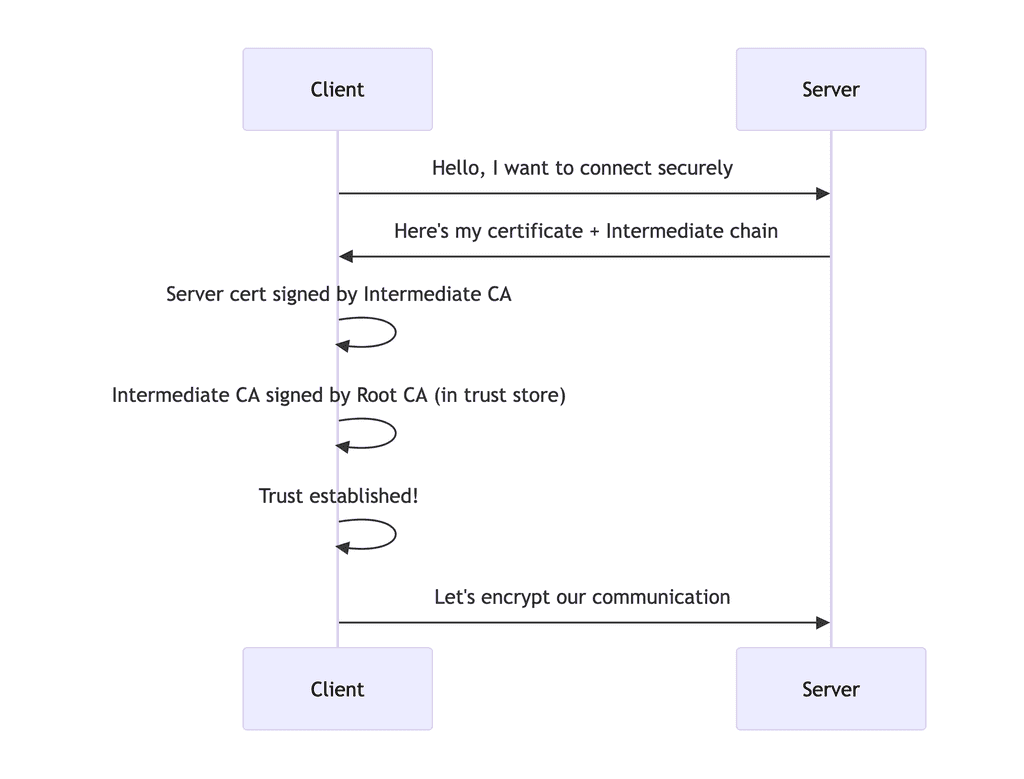
Verification Flow:
Hands-on walkthrough:
In this, we will create a Root CA, intermediate CA, and server certificate issued by intermediate CA. Then, we will test without passing intermediate CA to get the above errors, and finally, we will pass the complete chain to solve the issue. Let's get started.... bingooo, c'est parti...
Step 1: Create Directory structure
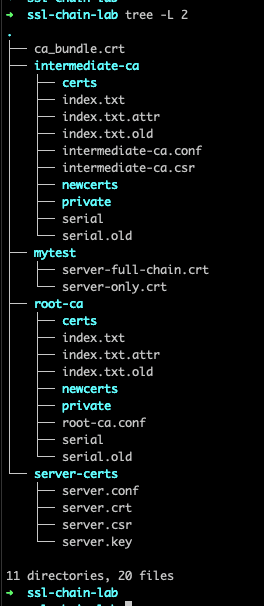
Firstly, create file/folder structure:
# Create our lab directory
mkdir ~/ssl-lab
cd ~/ssl-chain-lab

# Create directory structure
mkdir -p root-ca intermediate-ca server-certs
mkdir -p root-ca/private root-ca/certs root-ca/newcerts
mkdir -p intermediate-ca/private intermediate-ca/certs intermediate-ca/newcerts

# Create index files (required by OpenSSL)
touch root-ca/index.txt
touch intermediate-ca/index.txt
echo 1000 > root-ca/serial
echo 1000 > intermediate-ca/serial
It looks like this:
Step 2: Create Configuration Files
Root CA Configuration (cat root-ca/root-ca.conf):
#This is the main CA configuration
[ ca ]
# The default CA section to use
default_ca = CA_default

# The CA configuration section
[ CA_default ]
# Directory structure
dir = ./root-ca
certs = $dir/certs
crl_dir = $dir/crl
new_certs_dir = $dir/newcerts
database = $dir/index.txt
serial = $dir/serial
RANDFILE = $dir/private/.rand

# Certificate and private key
certificate = $dir/certs/root-ca.crt
private_key = $dir/private/root-ca.key

# Default settings
default_days = 365
default_crl_days = 30
default_md = sha256
preserve = no

# Policy for certificate signing
policy = policy_strict
# Or use policy_loose for more flexibility
# policy = policy_loose

# Signing requests
copy_extensions = copy

# The policy for certificate signing
[ policy_strict ]
countryName = match
stateOrProvinceName = match
organizationName = match
organizationalUnitName = optional
commonName = supplied
emailAddress = optional

# Loose policy for testing
[ policy_loose ]
countryName = optional
stateOrProvinceName = optional
localityName = optional
organizationName = optional
organizationalUnitName = optional
commonName = supplied
emailAddress = optional


[ req ]
default_bits = 4096
default_md = sha256
prompt = no
encrypt_key = yes
distinguished_name = root_ca_distinguished_name
x509_extensions = v3_ca

[ root_ca_distinguished_name ]
countryName = NP
stateOrProvinceName = Bagmati
localityName = Kirtipur
organizationName = Kailaba Homelab CA
organizationalUnitName = Root CA
commonName = My Homelab Root CA

[ v3_ca ]
subjectKeyIdentifier = hash
authorityKeyIdentifier = keyid:always,issuer
basicConstraints = critical, CA:TRUE, pathlen:2
keyUsage = critical, digitalSignature, keyCertSign, cRLSign


# Certificate extensions for signed certificates
[ v3_req ]
subjectKeyIdentifier = hash
authorityKeyIdentifier = keyid:always,issuer
basicConstraints = critical, CA:FALSE
keyUsage = critical, digitalSignature, keyEncipherment
extendedKeyUsage = serverAuth, clientAuth
Intermediate CA Configuration (cat intermediate-ca/intermediate-ca.conf):
# Main CA section
[ ca ]
default_ca = CA_default

# CA configuration
[ CA_default ]
dir = ./intermediate-ca
certs = $dir/certs
crl_dir = $dir/crl
new_certs_dir = $dir/newcerts
database = $dir/index.txt
serial = $dir/serial
RANDFILE = $dir/private/.rand

certificate = $dir/certs/intermediate-ca.crt
private_key = $dir/private/intermediate-ca.key

default_days = 365
default_crl_days = 30
default_md = sha256
preserve = no
policy = policy_loose
copy_extensions = copy

# Loose policy for intermediate CA
[ policy_loose ]
countryName = optional
stateOrProvinceName = optional
localityName = optional
organizationName = optional
organizationalUnitName = optional
commonName = supplied
emailAddress = optional

[ req ]
default_bits = 4096
default_md = sha256
prompt = no
encrypt_key = yes
distinguished_name = intermediate_ca_distinguished_name
x509_extensions = v3_req

[ intermediate_ca_distinguished_name ]
countryName = NP
stateOrProvinceName = Bagmati
localityName = Kirtipur
organizationName = Kailaba Homelab CA
organizationalUnitName = Intermediate CA
commonName = My Homelab Intermediate CA

[ v3_req ]
basicConstraints = critical, CA:TRUE, pathlen:1
keyUsage = critical, digitalSignature, keyCertSign, cRLSign
subjectKeyIdentifier = hash
authorityKeyIdentifier = keyid:always,issuer

[ v3_ca ]
subjectKeyIdentifier = hash
authorityKeyIdentifier = keyid:always,issuer
basicConstraints = critical, CA:TRUE, pathlen:0
keyUsage = critical, digitalSignature, keyCertSign, cRLSign
Server Certificate Configuration (cat server-certs/server.conf):
[ req ]
default_bits = 2048
default_md = sha256
prompt = no
encrypt_key = no
distinguished_name = server_distinguished_name
req_extensions = v3_req

[ server_distinguished_name ]
countryName = NP
stateOrProvinceName = Bagmati
localityName = Kirtipur
organizationName = Kailaba Homelab
commonName = ssltest.kailaba.local

[ v3_req ]
subjectAltName = DNS:kailaba.local,DNS:*.kailaba.local,DNS:localhost
keyUsage = critical, digitalSignature, keyEncipherment
extendedKeyUsage = serverAuth, clientAuth
basicConstraints = CA:FALSE
subjectKeyIdentifier = hash
Step 3: Generate the Root CA
# Generate Root CA private key (with password protection)
openssl genrsa -aes256 -out root-ca/private/root-ca.key 4096
# Set a password like: "root123" (remember this for later)

# Generate Root CA certificate (valid for 10 years) (
openssl req -config root-ca/root-ca.conf \
    -key root-ca/private/root-ca.key \
    -new -x509 -days 3650 \
    -extensions v3_ca \
    -out root-ca/certs/root-ca.crt

# View the Root CA certificate
openssl x509 -in root-ca/certs/root-ca.crt -text -noout
Step 4: Generate the Intermediate CA
# Generate Intermediate CA private key (with password protection)
openssl genrsa -aes256 -out intermediate-ca/private/intermediate-ca.key 4096
# Set a password like: "intermediate123"

# Generate Intermediate CA certificate signing request (CSR)
openssl req -config intermediate-ca/intermediate-ca.conf \
    -key intermediate-ca/private/intermediate-ca.key \
    -new -sha256 \
    -out intermediate-ca/intermediate-ca.csr

# Sign the Intermediate CA certificate with the Root CA
openssl ca -config root-ca/root-ca.conf \
    -extensions v3_ca \
    -days 1825 \
    -in intermediate-ca/intermediate-ca.csr \
    -out intermediate-ca/certs/intermediate-ca.crt

# Verify the Intermediate CA certificate
openssl verify -CAfile root-ca/certs/root-ca.crt \
    intermediate-ca/certs/intermediate-ca.crt

Step 5: Generate the Server Certificate
# Generate Server private key (unencrypted for Nginx)
openssl genrsa -out server-certs/server.key 2048

# Generate Server CSR
openssl req -config server-certs/server.conf \
    -key server-certs/server.key \
    -new -sha256 \
    -out server-certs/server.csr

# Sign the Server certificate with the Intermediate CA
openssl ca -config intermediate-ca/intermediate-ca.conf \
    -extensions v3_req \
    -days 365 \
    -in server-certs/server.csr \
    -out server-certs/server.crt

# Verify the Server certificate
openssl verify -CAfile intermediate-ca/certs/intermediate-ca.crt \
    server-certs/server.crt
If you verify like this, with only server certificate and not the full chain certificate, then you will get this error:
 openssl verify -CAfile intermediate-ca/certs/intermediate-ca.crt server-certs/server.crt
C=NP, ST=Bagmati, O=Kailaba Homelab CA, OU=Intermediate CA, CN=My Homelab Intermediate CA
error 2 at 1 depth lookup: unable to get issuer certificate
error server-certs/server.crt: verification failed

to resolve this, verify like this:
You can concatenate root and intermediate certs in the same file. Your client cert should be in a separate file.
ca_bundle.crt - contains root and intermediate
Generated by: cat

``
server-certs/server.crt - contains client cert
To verify the certificate chain you would use a command like this:
openssl verify -verbose -CAfile ca_bundle.crt server-certs/server.crt

Step 6: Test Different Certificate Configurations
Firstly, testing with Server certificate ONLY
cat server-certs/server.crt > server-only.crt
Test with openssl, open in two terminal:
# Start a test server (in one terminal)
openssl s_server -accept 8443 -cert server-only.crt -key server-certs/server.key

# In another terminal, test the connection
openssl s_client -connect localhost:8443 -CAfile root-ca/certs/root-ca.crt
We will get the same exact error:
Now, Server certificate + Intermediate certificate (Correct)
Create full chain:
cat server-certs/server.crt intermediate-ca/certs/intermediate-ca.crt > server-full-chain.crt
test again:
# Start test server

# Start the server with proper chain verification
openssl s_server -accept 8443 \
    -cert server-certs/server.crt \
    -key server-certs/server.key \
    -CAfile intermediate-ca/certs/intermediate-ca.crt \
    -cert_chain server-full-chain.crt

# Test connection
openssl s_client -connect localhost:8443 -CAfile root-ca/certs/root-ca.crt
Here is the workflow:
For more details and troubleshooting ssl issue, see this.
voilaa, merci beaucoup.