
Hey Champions, Let's explore more about our gspread and use this knowledge on real use case.
In this article, we will be creating a python script, which will use password generator and saves our used random generated password to google sheet.
I am using Geeksforgeeks random password generator using python for generating random password. Utilized this as a method and used it further to store actually used password to google sheet.
Before using this script, I assume that You already have:
- Installed the gspread python library
pip install gspread - Setup the requirements, and already downloaded the service_account.json file
Follow this article: Accessing Google Sheets using python
import gspread
import datetime
import string
import random


DATA_DICT = {}
passwd = ''
def write_to_sheet(data: dict):
    gc = gspread.service_account(filename="/your/path/to/service_account.json")
    sh = gc.open_by_key("<your-sheet-key>")
    worksheet = sh.get_worksheet(0)
    #worksheet_list = sh.worksheets()
    dataList = list(data.values())
    res = worksheet.append_row(dataList, table_range="A1:E1")
    if res:
        print("Record saved successfully.")

    display = input("Do you want to display the records?(Y/N)")
    if(display in ['Y','y']):
        display_sheet_content(worksheet)
    elif(display in ['N','n']):
        pass
    else:
        print("Continuing without displaying\n\n")

def display_sheet_content(worksheet: gspread.worksheet.Worksheet):
    values_list = worksheet.get_all_values()
    for row in values_list:
        l = len(row)
        for i in range(l):
            print(row[i], end='\t')
        print('\n')

def retrievePass():
    do_use=False
    while not do_use:
        passwd = passwordgen()
        print(passwd)
        use = input("Do you use this?(Y/N)")
        if(use in ['Y','y']):
            do_use = True
        elif(use in ['N','n']):
            do_use = False
        else:
            do_use = False

    return passwd


def passwordgen():
    # store all characters in lists
    s1 = list(string.ascii_lowercase)
    s2 = list(string.ascii_uppercase)
    s3 = list(string.digits)
    s4 = list(string.punctuation)


    # Ask user about the number of characters
    user_input = input("How many characters do you want in your password? ")


    # check this input is it number? is it more than 8?
    while True:

    	try:

    		characters_number = int(user_input)

    		if characters_number < 8:

    			print("Your number should be at least 8.")

    			user_input = input("Please, Enter your number again: ")

    		else:

    			break

    	except:

    		print("Please, Enter numbers only.")

    		user_input = input("How many characters do you want in your password? ")


    # shuffle all lists
    random.shuffle(s1)
    random.shuffle(s2)
    random.shuffle(s3)
    random.shuffle(s4)


    # calculate 30% & 20% of number of characters
    part1 = round(characters_number * (30/100))
    part2 = round(characters_number * (20/100))


    # generation of the password (60% letters and 40% digits & punctuations)
    result = []

    for x in range(part1):

    	result.append(s1[x])
    	result.append(s2[x])

    for x in range(part2):

    	result.append(s3[x])
    	result.append(s4[x])


    # shuffle result
    random.shuffle(result)


    # join result
    password = "".join(result)
    #print("Strong Password: ", password)
    return password


if __name__=='__main__':
    passw = retrievePass()
    username = input("Username:")
    where = input("Where? how you remember it?")
    date = datetime.datetime.now().strftime('%Y-%m-%d')
    DATA_DICT = {
            "reg-date": date,
            "username": username,
            "passw": passw,
            "where": where
            }
    write_to_sheet(DATA_DICT)
Sample output when running this script:
(pscripting) exceptionspg@Dell-5583:~/.../python-code$ python write-password-to-gsheet.py
How many characters do you want in your password? 10
Fw"CzPr87*
Do you use this?Y
Username:article-demo
Where? how you remember it?shivagyawali.com.np
Record saved successfully.
Do you want to display the records?(Y/N)Y
Date	Username	Password	Where

2023-10-17	shiva	HR6ov1W@gxQ>	facebook

2023-10-17 article-demo Fw"CzPr87* shivagyawali.com.np 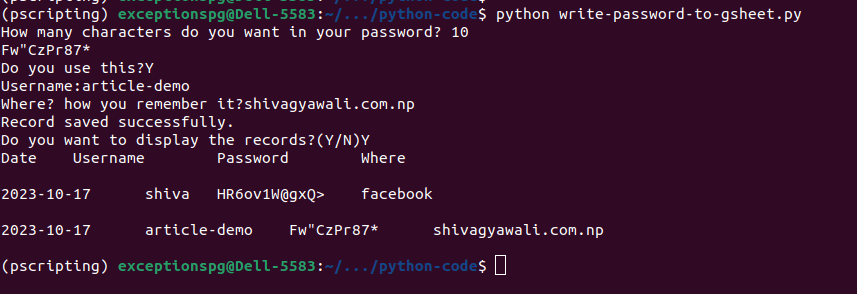
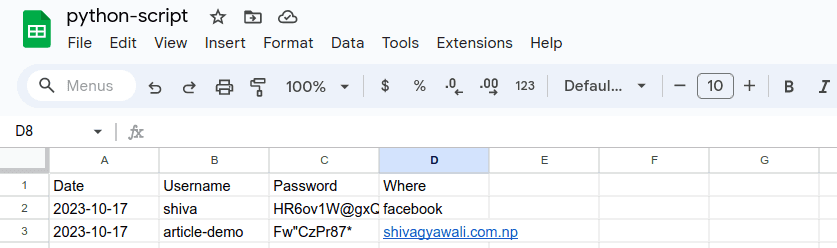
Stored records in Google Sheet:
You can use this script in any way. Thank you for reading :)
Happy Learning.